
Some kids need reminding. Every. Single. Bite.
Download Take a Bite on the App Store — free, with no in-app purchases and no advertising. For iPhone and iPad.
How it works
Record the reminder in your own voice
“Take a bite, please!” — in your voice, a grandparent's, or your kid's best cartoon impression. Record it once and the app does the repeating, so you don't have to.
The timer IS the button
The countdown ring fills most of the screen. Every time a bite goes in, your child taps it — with a chomping animation to go with it — and the countdown starts again.
Beat the clock and bank bonus seconds
A bite taken before the reminder plays earns whatever was left on the timer, with confetti and a cheer. Suddenly dinner is a game they're trying to win.
Features
One tap to start a meal
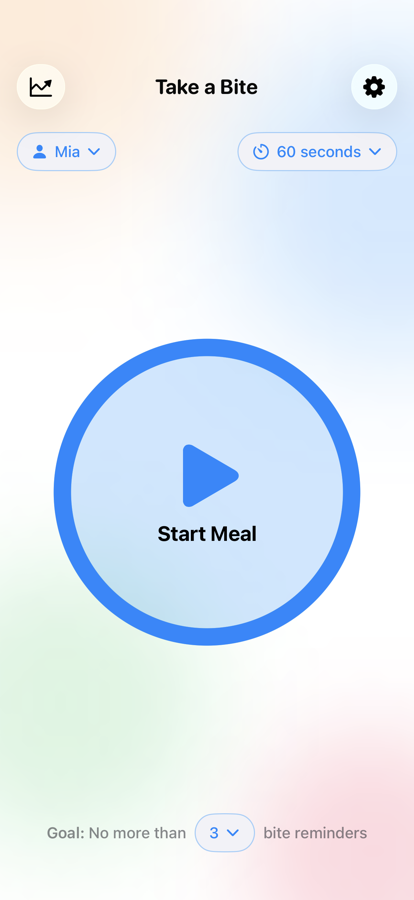
Pick who's eating and how long a bite should take, then press Start. No account, no sign-in, nothing to set up before the food gets cold.
Reminders needed is the score
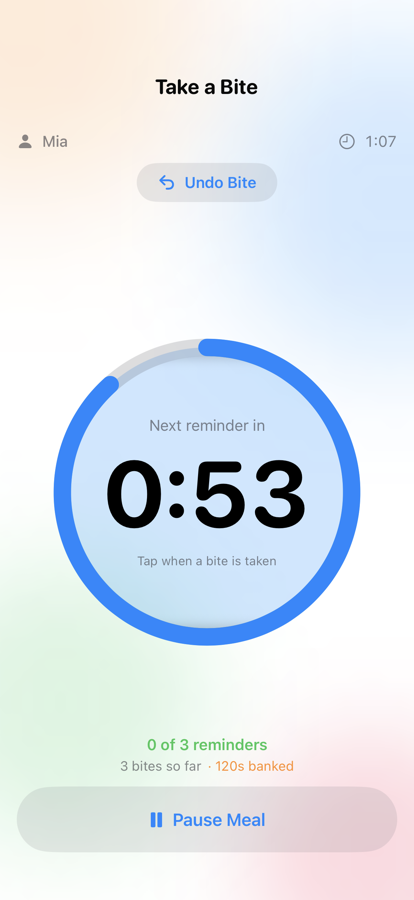
“80%” is not something a five-year-old can act on. “Two reminders left” is. Set an allowance — three by default — and the screen goes green, orange, then red as they're used.
Celebrate the early bites
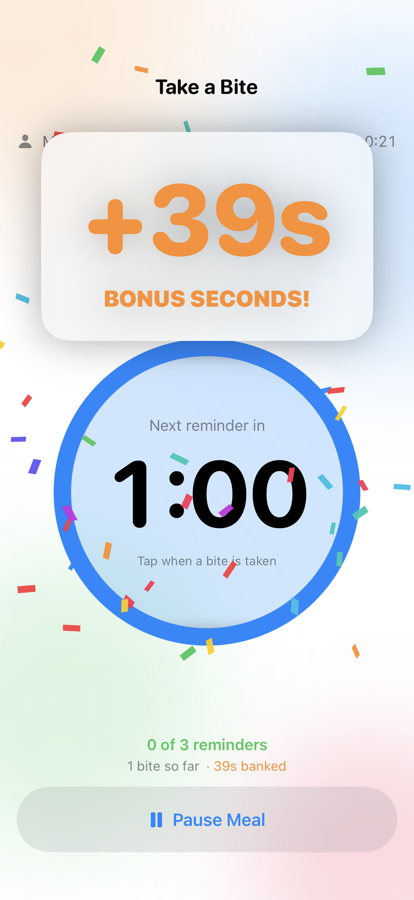
Bites that beat the reminder bank the time that was left, with confetti and a cheer. It's the moment kids start racing the clock instead of ignoring it.
Every meal gets a scorecard
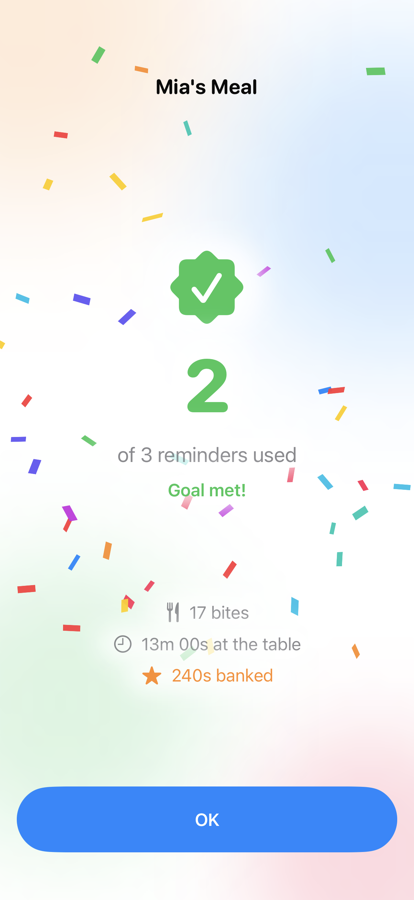
Reminders needed, bites, bonus seconds, time at the table and average response time — saved the moment the meal ends, and judged against the goal that meal actually had.
Watch the nagging drop off
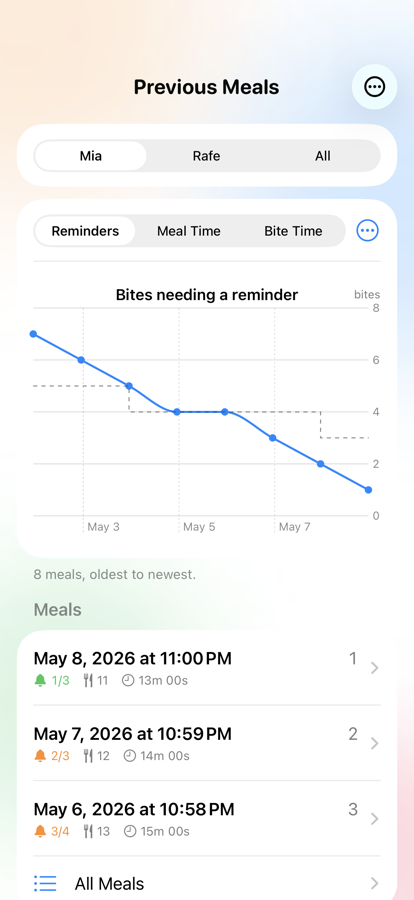
A chart plots meal after meal so you can see the trend, not just tonight. More than one kid? Log meals per child and switch between their charts with a tap.
Make every sound yours
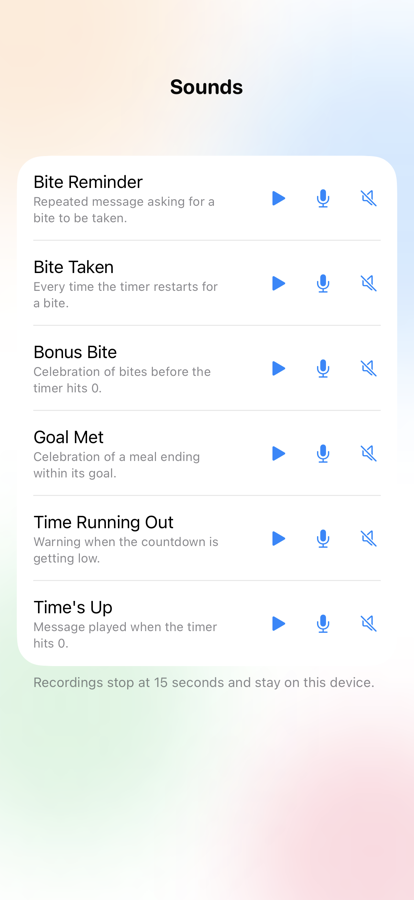
The reminder, the countdown warning, the time's-up “oh no!”, the chomp and the celebration can all be replaced with a recording made right in the app. Let the kids record them — it's half the fun.
The details that matter at the table
Pause for real life
Potty break? More milk? Pause any time and carry on with one tap — the countdown picks up exactly where it left off.
Resume a meal you ended early
Ended the meal and they picked the fork back up? For fifteen minutes it's still there on the main screen, so the sitting stays one meal instead of two.
Silly Mode, if you want it
Turn it on and each unanswered reminder comes a little sooner, a little louder and a little faster — until it's comically insistent.
Fix the history
Edit, delete or merge past meals. A sitting split across two entries becomes one, with the math done properly rather than averaged twice.
Syncs across your devices
Meal history syncs privately through your own iCloud account, so the same meals appear on your iPhone and your iPad.
Built properly
Designed for iPhone and iPad, with full support for Dynamic Type, VoiceOver and dark mode.
Privacy
Your recordings stay on your device. Your children's names never leave it. There is no account, no sign-in, and nothing to subscribe to.
Meal history syncs privately through your own iCloud account, so the same meals appear on your iPhone and iPad. Custom sounds stay local to each device.
Support
- Does Take a Bite cost anything?
- No. There are no in-app purchases, no subscription and no advertising. The whole app is there the moment you download it.
- Do I have to record a message before we can eat?
- No. Every sound — including the bite reminder — ships with a built-in default, so you can start a meal within seconds of installing. Recording your own is optional, and you can do it later from Settings › Sounds.
- My child taps the timer twice by accident. Does that count as two bites?
- No. A tap that lands within the first three seconds of a countdown doesn't count at all. And for a few seconds after every bite, an Undo Bite button appears above the ring.
- Why doesn't my meal history show up on my other device?
- History syncs through your own iCloud account, so both devices need to be signed into the same Apple ID with iCloud Drive turned on. Custom sound recordings are deliberately local to each device and don't sync.
- I ended a meal by mistake. Is it gone?
- Not for fifteen minutes. A meal that ended recently can be picked back up straight from the setup screen, and it carries on as one meal rather than being split into two entries. After that, you can still merge the two records together from the meal history.
- Where are my recordings stored?
- On your device, and nowhere else. Your children's names never leave it either. There's no account and no sign-in.
- Is it on Android?
- Not today — Take a Bite is iPhone and iPad only. Drop us a line if you'd like to be told when that changes.
Still need a hand? Email [email protected].
Also from us
Puzz is a suite of beautifully designed critical thinking games for kids ages 5+. Inspired by classic board games, built to grow the skills that matter most in the AI era. Explore Puzz.